

Persistent Protection
Crypto-enforced protection stays with your file—no matter wher it goes.
Granular Access Controls
Define exactly how recipients can access, view, download, print, and share your files.
Full Visibility
Know when, and how your attachments are accessed in real time.
Instant Revocation
Revoke access anytime, even after the email, has been opened
Take Control of Every Email Attachment
Traditional email gives away your data the moment you hit send.
Locktea Share for Outlook keeps you in control with persistent encryption,
access policies, and full audit trails.
Encrypt & Protect
Attachments are encrytpted before they leave your inbox. Only authorized recipients can access.
Granular DRM Controls
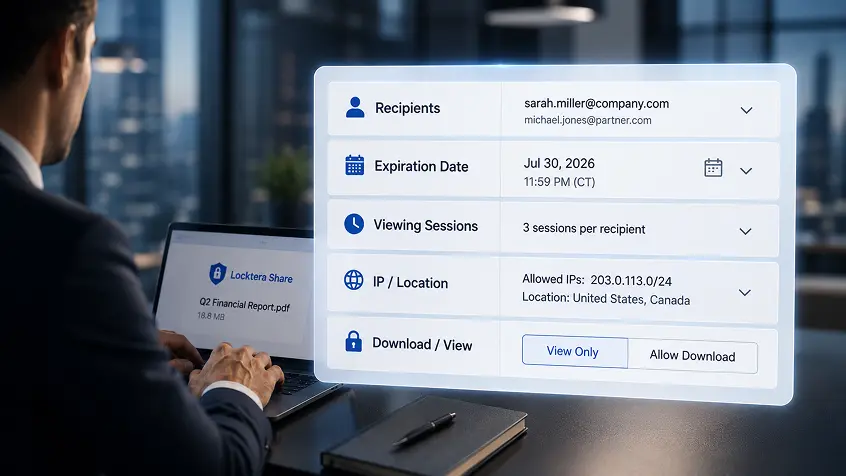
Control how every recipient can view, download, print, forward, and interact with your files.
Time-Bound & Conditional Access
Set expiration dates, restrict by location, IP, or device, and require authentication.
Real-Time Notifications
Get instant alerts when your attachments are opened, downloaded or shared.
Complete Audit Trail
Track every access event with user, time, location, and action details.
Instant Revocation
Revoke access at any time—even if the time has already been opened.
Built for Outlook. Ready for Your Microsoft Environment.
Locktera Share works seamlessly with Microsoft Outlook, Microsoft 365, Azure, and Entra ID—so your team can protect sensitive attachments without changing how they work.




Take Control of Every Email Attachment
Legal
Protect privileged documents and client confidentiality.
Healthcare
Secure PHI, lab results, and patient records.
Financial Services
Share sensitive reports and client data with confidence.
Government
Maintain compliance and control over official information.
Enterprise
Strengthen data protection across departments and partners.
Security You Can Trust
Locktera uses client-side encryption and a zero-knowledge architecture so only you and authorized recipients can access your data.


Start Sending Secure Email Attachments Today
Locktera Share for Outlook empowers you to protect every file, maintain compliance,
and stay in control—wherever your data goes.
Frequently Asked Questions
What is Locktera Share for Microsoft Outlook?
Locktera Share is a secure Microsoft Outlook integration that protects email attachments with persistent encryption, granular access controls, digital rights management (DRM), and complete audit trails. Unlike traditional email attachments, your security policies remain attached to the file wherever it is stored, shared, or accessed.
What do I need to get started?
Getting started takes only a few minutes.
You’ll need:
- A Locktera Share subscription
- The Locktera Share for Microsoft Outlook add-in installed from the Microsoft Marketplace
- A Microsoft Outlook or Microsoft 365 account
Once installed, users can begin sending protected email attachments directly from Outlook without changing their existing workflow.
Where do I install the Outlook add-in?
The Locktera Share add-in is available through the Microsoft AppSource Marketplace and integrates directly into Microsoft Outlook.
After installation, a Send Securely with Locktera button appears within Outlook, allowing users to protect attachments before sending.
Do I need Microsoft Entra ID?
No.
Microsoft Entra ID is optional.
Organizations can manage users, groups, permissions, and authentication directly within Locktera Share without deploying Entra ID.
For organizations already using Microsoft Entra ID, Locktera also supports integration for simplified identity management and single sign-on.
Can I use my own storage?
Yes.
Locktera supports Bring Your Own Storage (BYOS) so organizations can keep protected content in their own cloud storage while Locktera manages persistent security, access controls, auditing, and governance.
Supported storage platforms include:
- Microsoft Azure Blob Storage
- Amazon S3
- Google Cloud Storage
- Wasabi
- Akamai NetStorage
- S3-compatible object storage
What makes Locktera different from traditional email attachments?
Traditional email attachments become uncontrolled after they’re sent. Recipients can forward, download, copy, or store them indefinitely.
Locktera protects the file itself. Encryption, access controls, DRM policies, and audit capabilities remain attached to the file wherever it travels.
Even after delivery, administrators can update permissions or revoke access.
What types of files can I protect?
Locktera protects virtually any file type, including:
- Microsoft Office documents
- PDFs
- CAD drawings
- Images
- Videos
- ZIP archives
- Engineering files
- Legal documents
- Healthcare records
- Financial reports
- Source code
- Technical documentation
How large can my attachments be?
Locktera Share for Microsoft Outlook supports secure email attachments up to 2 GB.
For larger files, organizations can also securely share content using the Locktera Share web application.
Can I control who opens a file?
Yes.
Administrators can specify exactly who is authorized to access protected files using recipient-based permissions, role-based access, or organizational policies.
Only authorized users can decrypt protected content.
What access controls are available?
Locktera provides granular policy controls including:
- View-only access
- Download permissions
- Expiration dates
- Maximum viewing sessions
- Approved recipients
- IP address restrictions
- Geographic location restrictions
- Organization-only access
- Dynamic permission updates
- Access revocation
Can I revoke access after sending an email?
Yes.
Unlike traditional email attachments, Locktera allows administrators to modify permissions or revoke access at any time—even after the email has already been delivered.
Recipients immediately receive the updated security policy when attempting to access the file.
Will I know when someone opens my attachment?
Yes.
Locktera provides real-time notifications and detailed audit reporting so you always know when protected files are accessed.
Audit information includes:
- User
- Date and time
- IP address
- Geographic location
- Device information (when available)
- Access result
- Download activity
- Policy changes
Does Locktera provide a complete audit trail?
Yes.
Every significant event is recorded to create a complete chain of custody for protected files.
Organizations can review:
- File access
- Permission updates
- Access denials
- Downloads
- Revocations
- Administrative changes
- Read notifications
This visibility supports internal governance, security investigations, and regulatory compliance.
Does Locktera encrypt files before they leave Outlook?
Yes.
Locktera applies client-side encryption before files leave the sender’s device, ensuring content remains protected throughout transmission, storage, and sharing.
Where is the encryption applied?
Unlike solutions that only encrypt data during transmission or while stored on a server, Locktera protects the file itself.
Persistent encryption remains attached to the file regardless of where it is stored, copied, or shared.
Is Locktera a secure file transfer service?
Locktera provides secure file sharing, but its primary advantage is persistent data protection.
Protection continues after delivery through encryption, DRM, access controls, audit trails, and ongoing policy enforcement.
Does Locktera support external collaboration?
Yes.
Securely share protected files with:
- Customers
- Partners
- Vendors
- Attorneys
- Healthcare providers
- Contractors
- Government agencies
without losing control of your information.
Which industries use Locktera?
Locktera is designed for organizations handling sensitive or regulated information, including:
- Healthcare
- Legal
- Financial Services
- Government
- Manufacturing
- Engineering
- Energy
- Insurance
- Enterprise IT
Does Locktera help with compliance?
Yes.
Locktera helps organizations implement security controls commonly required for compliance initiatives including:
- HIPAA
- GDPR
- SOC 2
- ISO/IEC 27001
- Internal security and governance policies
While compliance depends on an organization’s overall processes and controls, Locktera provides features such as encryption, audit trails, access management, and data governance that support those efforts.
Can developers integrate Locktera into their own applications?
Yes.
Developers can embed Locktera’s persistent security, encryption, DRM controls, auditing, and governance directly into custom applications using the Locktera CORE™ APIs and SDKs.
Is there a free trial?
Yes.
Organizations can start a free Locktera Share trial and begin securing Outlook attachments in minutes.
No changes to existing email workflows are required.